TouchTask

Task management meets habit tracking

The Problem With Five Tabs

Most engineers managing their day run four or five tools in parallel: a task manager for the backlog, a calendar for appointments, a pomodoro timer for focus sessions, a habit tracker for recurring routines, and something like Trello or Linear for the week’s work in flight. Each tool does its job. None of them knows the others exist.

The friction is not using any single tool — it’s the constant reorientation between them. Different data models. Different keyboard shortcuts. Different ideas about what “today” means. You close the timer to check the board, switch back to the calendar for an appointment, lose track of where you were in the task list. The cognitive overhead of orchestrating five tools is not zero.

The design question behind TouchTask was precise: what is the minimum integrated tool that replaces those five tabs?

Backend vs. No Backend

The first structural decision was whether to build a backend. The case for one is real: cross-device sync, account recovery, the option to add collaboration later. Most productivity apps take this route because it positions them to grow.

The case against one is also real, and for a single-user daily-rituals tool it tends to win. A backend requires an account system, hosting infrastructure, a privacy model, and maintenance that compounds indefinitely. It means asking a user to trust a server with data about how they spend every hour of their day. It introduces a dependency that can go down, get deprecated, or require a subscription to keep running.

localStorage on the machine you already use is a different trade. You lose cross-device sync. You gain that your data stays on your hardware, the app has no running cost, and it keeps working when the internet does not. For a tool built around daily rituals — things you do on the same machine, at the same desk, every day — that trade is defensible.

The risk is also bounded in a useful way: if the approach is wrong for a user, they know immediately. There is no migration path because there is no server to migrate from. The constraint is self-documenting.

Integrated vs. Composed

The second decision was whether to build an integrated tool or a composed one. You could, instead of building TouchTask, wire together Todoist, Google Calendar, Forest, and Trello. The apps exist. Some of them have APIs.

The problem with composition is that each tool brings its own data model. Your “tasks” in Todoist are not the same objects as your “cards” in Trello, which are not the same as your “events” in Google Calendar. Making them talk requires integration work that never fully converges — and even when it does, you are still context-switching between four interfaces with four different interaction patterns and four different ideas about priority.

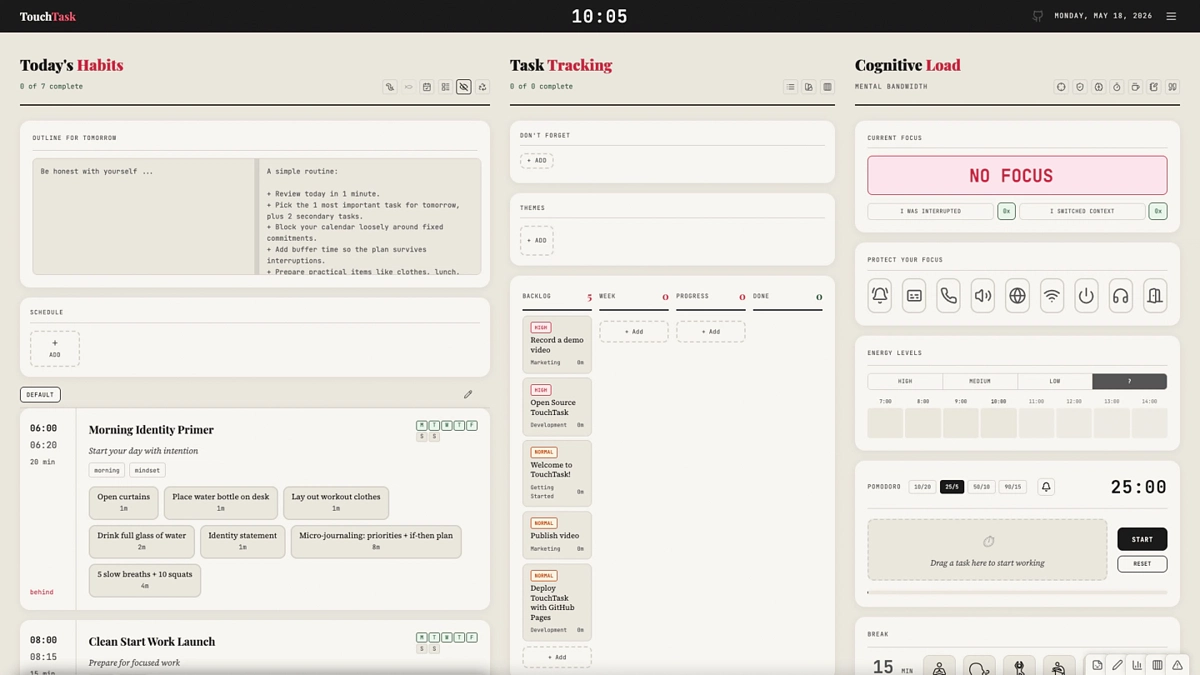
An integrated tool keeps everything in one data model and one visual frame. You see your kanban board, your time blocks, your pomodoro timer, and your daily schedule without switching context. The cost is that on any single axis — just task management, just calendar — the specialist tool is almost certainly stronger. That is an acceptable trade if the user’s actual need is coordination across all four, not depth on any one.

An Opinionated Design

TouchTask is deliberately narrow in what it supports. The kanban board has four columns — backlog, week, progress, done — not the configurable N-column boards that tools like Trello or Linear offer. Time blocks are recurring by construction: they model habits and routines, not flexible calendar events. The pomodoro interval is a known quantity, not a dial.

These constraints are not oversights. They are the design. An opinionated tool makes decisions so the user does not have to. The tradeoff is that a user whose workflow does not fit the opinionated model will find the tool stubborn. That is fine. The tool is built around one specific pattern of how an engineer might structure a productive day, and it works well for users who share that pattern. Users who do not are not the target audience, and accommodating them would dilute what makes it useful for users who are.

What It Leaves Out

No mobile app — the web application works on mobile browsers, but there is no native app and no offline-first service worker architecture. No sync — data lives in one browser’s localStorage on one machine. No sharing or collaboration — this is a single-user tool by construction. No integrations with Jira, Slack, GitHub, or calendar services.

Each of these is a real missing feature, not an oversight. Adding any of them would pull the tool toward a different product with a different maintenance surface. The decision to leave them out is the same decision as the one to skip the backend: stay small enough to stay honest about what the tool actually is.