
TTS MCP
Local text-to-speech for AI agents, powered by Mistral's Voxtral on Apple Silicon
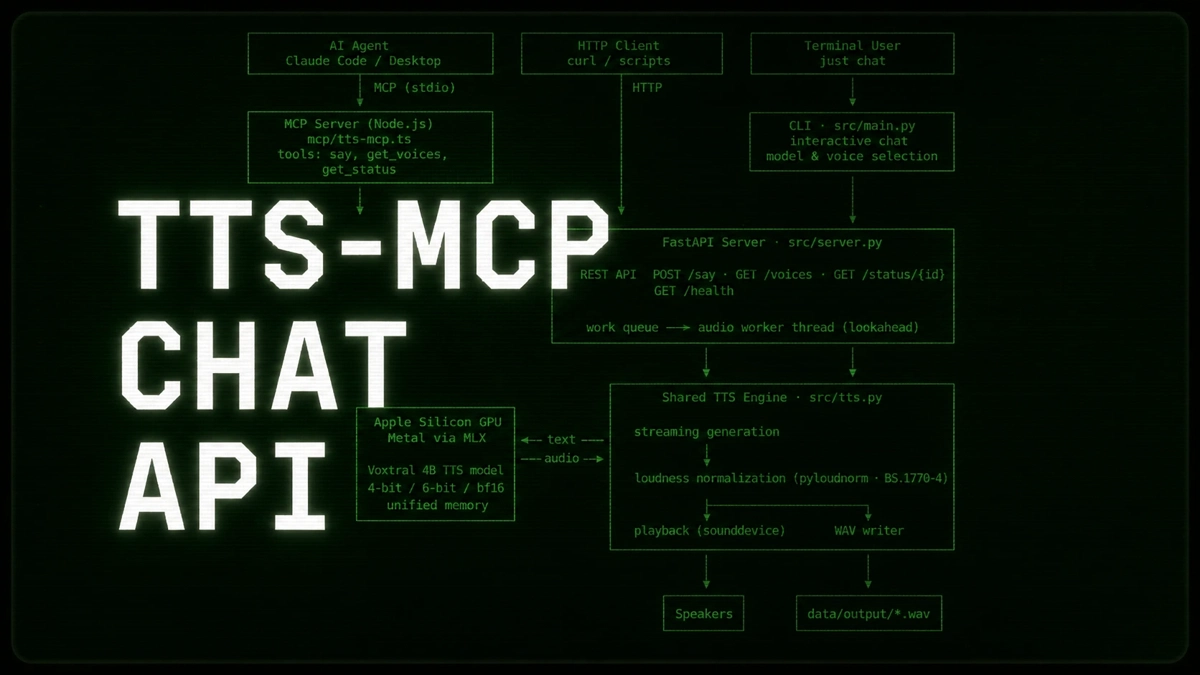
TTS MCP runs Mistral’s Voxtral text-to-speech model locally, with real-time streaming playback, an interactive CLI, a FastAPI server, and an MCP server that lets Claude Code and Claude Desktop speak. It ships 20 voices across 9 languages and several quantization options, with no cloud dependency.
Quick Start
Requires an Apple Silicon (but is easily adaptable to Linux), Python 3.12+, uv, and just. Clone the GitHub repository, install the dependencies and download a tts model as follows:
git clone https://github.com/florianbuetow/tts-mcp.git
cd tts-mcp
just init        # install dependencies
just download    # choose and download a Voxtral model
The just download step lets you pick from three quantization variants of Voxtral 4B, trading size against speed and quality:
| Model | Size | Speed |
|---|---|---|
Voxtral-4B-TTS-2603-mlx-4bit | ~2.5 GB | Fastest (RTF below 1.0x) |
Voxtral-4B-TTS-2603-mlx-6bit | ~3.5 GB | Balanced (RTF ~1.1x) |
Voxtral-4B-TTS-2603-mlx-bf16 | ~8.0 GB | Highest quality (RTF ~6.3x) |
Next, create/edit the config.yaml the defaults in the project root. The parameters default_voice and save_wav control the voice and whether or not anything sent through the API gets saved to data/output/ as a timestamped WAV file.
model: ./data/models/Voxtral-4B-TTS-2603-mlx-6bit
models_dir: ./data/models
sample_rate: 24000
default_voice: de_male
save_wav: true
simplify_punctuation: false
normalize_audio: true
target_lufs: -20.0
true_peak_ceiling_db: -1.0
min_duration_seconds: 0.5
host: 0.0.0.0
port: 12000
With the model and config in place, you can start the REST API server or launch the interactive chat:
just serve    # start the FastAPI server: POST /say, GET /voices, GET /status/{id}
just chat     # start the interactive CLI chat
The just chat command loads the model in-process, lets you pick a voice, then synthesizes whatever you type (Enter twice submits, ESC twice quits the REPL):
=== Running Interactive Chat ===
Using model: Voxtral-4B-TTS-2603-mlx-6bit

Available voices:
  1. ar_male
  2. casual_female
  3. casual_male
  ...
  20. pt_male

Select voice [1-20]: 6
Loading model: data/models/Voxtral-4B-TTS-2603-mlx-6bit
Voice: de_male
Type text. Enter twice submits (single Enter = newline). Enter twice on empty input or ESC twice quits.
Text: Hello, it is nice to see you today!
To use TTS from your AI assistant, you need to install the MCP bridge with cd mcp && npm install inside the cloned project and then register the MCP server in the configuration of your AI of choice. The easiest way to do that is to ask your AI to do that for you:
Prompt your AI
“I need your help to configure the tts-mcp server for codex app, claude desktop and claude cli. There is an example on how to configure it in README.md. Please use it.”
Supported Voices
Pick from 20 voices across 9 languages. Pass any as the voice parameter, or choose one interactively in the CLI:
| Language | Voices |
|---|---|
| English | casual_female, casual_male, cheerful_female, neutral_female, neutral_male |
| German | de_female, de_male |
| French | fr_female, fr_male |
| Spanish | es_female, es_male |
| Italian | it_female, it_male |
| Dutch | nl_female, nl_male |
| Portuguese | pt_female, pt_male |
| Hindi | hi_female, hi_male |
| Arabic | ar_male |
Learn More
If you want to learn more about Mistral’s Voxtral text-to-speech models, click here. If you want to experiment with the models, here is a good place to start.
Links
- TTS-MCP on GitHub
- Voxtral-4B-TTS-2603 on Huggingface
- About Voxtral TTS models on Mistral.ai
- uv installation
- just installation