
Driving the Guard Tool from Claude Code with this New Plugin
What Is Guard?
Back in February, I released Guard, an open source CLI tool written in GoLang that physically locks files against AI coding agents using Unix permissions and the immutable flag. It works, but driving it by hand gets tedious: you have to remember which subcommand registers files versus which one actually locks them, build collections one path at a time, and recall which operations need sudo. Even when you use interactive mode, you still have to select folders and individual files, which can get tedious if you have to search and dig deep enough to find them.
Today I’m releasing a helper companion that allows you to quickly create collections of files in guard, by specifying them in natural language to Claude Code.
What Does the Plugin Do?
The guard plugin allows you to ask Claude to “guard my test files,” “remove the migrations collection,” and “what’s currently guarded?” When you do that, it maps your intent onto the right guard commands across five native guard commands:
- init - sets up the
.guardfilewith sensible defaults (0750, root-owned, your group keeps read+execute) - create-collection - finds the files from a description or list, registers them, and groups them into a named collection
- remove-collection - tears a collection down, handling the guarded-vs-unguarded case correctly
- clear-all - restores every file and empties the registry while keeping your config
- info - shows collections and loosely guarded files at a glance
Security Built In: Agent Can’t Actually Lock Anything
Guard’s whole security model depends on the AI running without sudo. So the plugin leans into that. Any operation that changes a file’s guard state - enable, disable, reset - requires root to clear the immutable flag, which means the agent physically cannot perform it. Instead, it composes the exact command and prints it for you to run. Super convenient:
sudo guard enable collection "my-tests"
Everything that doesn’t need root - registering files, building collections, reading status - the agent just does. The split falls out naturally from the permission model: the dangerous half is gated behind a password the agent doesn’t have, and the plugin’s job is simply to hand you a clean, correct command for that half.
No scripts were written to disk, no config files, no magic. It reads guard show to decide what needs sudo, quotes its arguments, and otherwise stays out of the way.
How I Use It
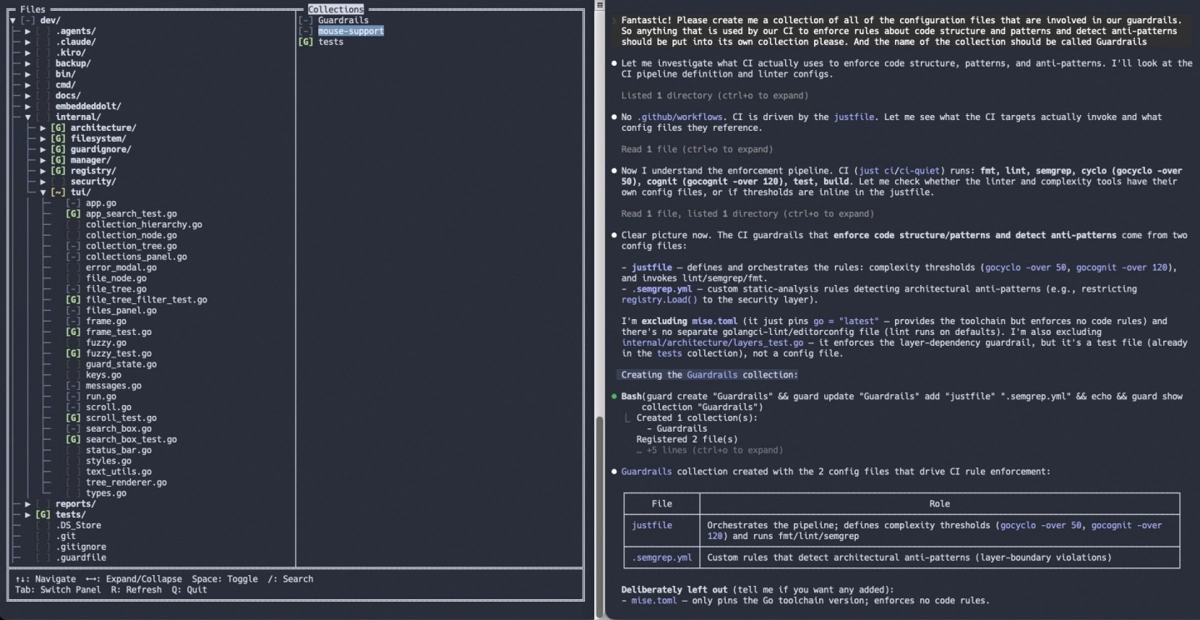
I have a terminal session where I run guard in an interactive mode (launch with sudo guard -i as a superuser. And I have another terminal window in which my coding agent runs without sudo privileges, to create and modify collections on the fly. Pressing r in the TUI causes it to load collection information written by the agent on the right. Providing access to the collection toggle for fast switching of write permissions on all files that belong to the selected collection.
Installation
claude plugin marketplace add florianbuetow/claude-code
claude plugin install guard
References
- Guard CLI on GitHub
- Article Yes, You Are Absolutely Right!
- Guard Tool project page
- Guard Plugin on GitHub
- My (free) Plugin Marketplace